Object Oriented Programming Unit-5a Basic Theory

  • Exception Handling
  • Type Casting
  • Templates function and class in C++
  • Features of Java
  • Introduction to Java
  • Comparison Between C++ and Java
  • Inheritance
  • Interface and Abstract class in Java

One of the advantages of C++ over C is Exception Handling.

Exceptions are run-time anomalies or abnormal conditions that a program encounters during its execution.

There are two types of exceptions:

a) Synchronous,

b) Asynchronous (Ex:which are beyond the program’s control, Disc failure etc). C++ provides following specialized keywords for this purpose.

try: represents a block of code that can throw an exception.

catch: represents a block of code that is executed when a particular exception is thrown.

throw: Used to throw an exception. Also used to list the exceptions that a function throws, but doesn’t handle itself.

Following are main advantages of exception handling over traditional error handling.

1) Separation of Error Handling code from Normal Code:

In traditional error handling codes, there are always if else conditions to handle errors. These conditions and the code to handle errors get mixed up with the normal flow. This makes the code less readable and maintainable. With try catch blocks, the code for error handling becomes separate from the normal flow.

2) Functions/Methods can handle any exceptions they choose:

A function can throw many exceptions, but may choose to handle some of them. The other exceptions which are thrown, but not caught can be handled by caller. If the caller chooses not to catch them, then the exceptions are handled by caller of the caller.

In C++, a function can specify the exceptions that it throws using the throw keyword. The caller of this function must handle the exception in some way (either by specifying it again or catching it)

Example:

Type casting is a way to convert a variable from one data type to another data type.

For example, if you want to store a long value into a simple integer then you can typecast long to int.

There are two types of type casting in OOP language (C++)

1. Implicit Type Conversion

2. Explicit Type Conversions

It is also known as automatic type conversion.

Done by the compiler on its own, without any external trigger from the user.

Generally takes place when in an expression more than one data type is present. In such condition type conversion (type promotion) takes place to avoid lose of data.

All the data types of the variables are upgraded to the data type of the variable with largest data type.

• bool -> char -> short int -> int ->

• unsigned int -> long -> unsigned ->

• long long -> float -> double -> long double

Imp Note: It is possible for implicit conversions to lose information, signs can be lost (when signed is implicitly converted to unsigned), and overflow can occur (when long long is implicitly converted to float).

For Example:

This process is also called type casting and it is user-defined.

Here the user can typecast the result to make it of a particular data type.

In C++, it can be done by two ways:

Converting by assignment: This is done by explicitly defining the required type in front of the expression in parenthesis. This can be also considered as forceful casting.

Syntax: (type) expression

#include using namespace std;
int main()
{
double x = 1.2;
// Explicit conversion from double to int int sum = (int)x + 1;
cout << "Sum = " << sum; return 0;
}

Conversion using Cast operator: A Cast operator is an unary operator which forces one data type to be converted into another data type.

C++ supports four types of casting:

1. Static Cast

2. Dynamic Cast

3. Const Cast

4. Reinterpret Cast

A template is a simple and yet very powerful tool in C++.

The simple idea is to pass data type as a parameter so that we don’t need to write the same code for different data types.

For example, a software company may need sort() for different data types. Rather than writing and maintaining the multiple codes, we can write one sort() and pass data type as a parameter.

C++ adds two new keywords to support

templates: template and typename.

The second keyword can always be replaced by keyword class.

Templates are expanded at compiler time.

This is like macros.

The difference is, compiler does type checking before template expansion.

The idea is simple, source code contains only function/class,

but compiled code may contain multiple copies of same function/class.

• Java is powered by Oracle - one of the leaders in the industry.

• Java also gets enormous support from big technology companies like IBM, Google, Redhat.

• There are a lot of open source libraries helping for building applications.

• There are many superior tools and IDEs making Java development easier.

• There are many frameworks that help in building highly reliable applications quickly.

• The community around Java technology is very big and mature, so that support can get easily.

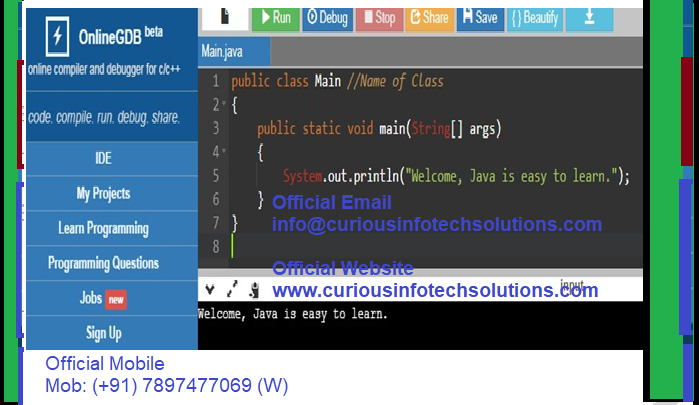
Step-1: Write code in Notepad.

public class Main //Name of Class
{
public static void main(String[] args)
{
System.out.println("Welcome, Java is easy to learn.");
}
}

Step-2: Save with name Main.java

Step-3: Compile Main.java through javac (Ensure JDK and path of javac.exe)

javac Main.java
Step-4: See is there file Main.class? If yes, then OK else problem in program

Step-5: Interpret Main.class the through java (Ensure JRE and path of java.exe)

java Main Step-6: See is there result?
Welcome, Java is easy to learn. Java program can also be run through online Java Complier.
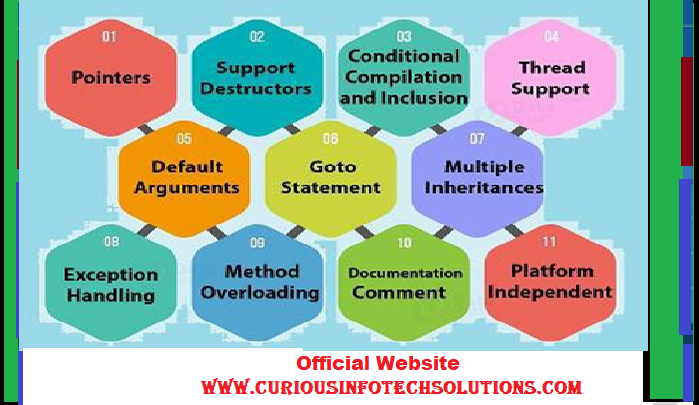
  • 1. Pointers Java: Java does not support pointers, templates, pointer overloading, unions, etc. C++: C++ does support pointers, structures, unions, templates, operator overloading, or pointers arithmetic.

  • 2. Support Destructors Java: Java doesn’t support destructors; it has an automatic garbage collection system. C++: It supports destructors; it gets invoked when an object is destroyed.

  • 3. Conditional Compilation and Inclusion Java: It doesn’t support conditional compilation and inclusion. C++: These are the major features of C++.

  • 4. Thread Support Java: It has built-in supports threads in Java. There is a thread class in Java, inherit to create a new thread override the run method. C++: It has no built-in supports. It depends on third-party libraries.

  • 5. Default Arguments Java: Java does not support default arguments. There is no (::) in Java. The strategy definitions should dependably happen inside a class, so there is no requirement for scope determination there either. C++: C++ supports default arguments. C++ has scope resolution (::), which utilize and characterize a strategy outside a class to get to a worldwide variable inside from the degree where a neighborhood variable additionally exists with a similar name.

  • 6. goto Statement Java: There is no goto statement in Java. The keywords const and goto are reserved, even though they are not used. C++: C++ has goto articulation. Nonetheless, it isn’t viewed as a great practice to a utilization of goto explanation.

  • 7. Multiple Inheritances Java: Java doesn’t provide multiple inheritances, at least not in the same sense that C++ does. C++: C++ supports different inheritance. The keyword virtual utilize to determine ambiguities amid various legacy, if there is any.

  • 8. Exception Handling Java: Exception handling is different because there are no destructors. In Java, try/catch must define if the function declares that it may throw an exception. C++: While in C++, the attempt/get may be excluded regardless of whether the capacity throws an exemption.

  • 9. Method Overloading and Operator Overloading Java: Java has method overloading but no operator overloading. The String class does use the + and += operators to concatenate strings and String expressions use automatic type conversion, but that’s a special built-in case. C++: C++ supports both technique over-loading and administrator over- loading.

  • 10. Documentation Comment Java: Java has built-in support for documentation comments (/** … */); therefore, Java source files can contain their own documentation, which is read by a separate tool usually Java doc and reformat into HTML. This helps to keep documentation maintained in an easy way. C++: C++ does not support documentation remarks.

  • 11. Platform Independent Java: Java is interpreted for the most part and, hence, platform independent. C++: C++ creates protest code, and a similar code may not keep running on various stages

1. Inheritance in Java is a mechanism in which one object acquires all the properties and behaviors of a parent object. It is an important part of OOPs (Object Oriented programming system).

2. The idea behind inheritance in Java is that you can create new classes that are built upon existing classes. When you inherit from an existing class, you can reuse methods and fields of the parent class. Moreover, you can add new methods and fields in your current class also.

3. Inheritance represents the IS-A relationship which is also known as a parent-child relationship.

Why use inheritance in java

a. For Method Overriding (so runtime polymorphism can be achieved).
b. For Code Reusability.

Terms used in Inheritance
• Class: A class is a group of objects which have common properties. It is a template or blueprint from which objects are created.
• Sub Class/Child Class: Subclass is a class which inherits the other class. It is also called a derived class, extended class, or child class.
• Super Class/Parent Class: Superclass is the class from where a subclass inherits the features. It is also called a base class or a parent class.

• Reusability: As the name specifies, reusability is a mechanism which facilitates you to reuse the fields and methods of the existing class when you create a new class. You can use the same fields and methods already defined in the previous class


The syntax of Java Inheritance
class Subclass-name extends Superclass-name
{
//methods and fields
}

• The extends keyword indicates that you are making a new class that derives from an existing class. The meaning of "extends" is to increase the functionality.

• In the terminology of Java, a class which is inherited is called a parent or superclass, and the new class is called child or subclass.

On the basis of class, there can be three types of inheritance in java:
single inheritance,
multilevel inheritance and
hierarchical inheritance.

In java programming, multiple and hybrid inheritance is supported through interface only.

What is Interface?


The interface is a blueprint that can be used to implement a class.

The interface does not contain any concrete methods (methods that have code).

All the methods of an interface are abstract methods.

An interface cannot be instantiated. However, classes that implement interfaces can be instantiated.

Interfaces never contain instance variables but, they can contain public static final variables (i.e., constant class variables)

• Interfaces are used to achieve abstraction.

• It helps you to achieve loose coupling.

• Designed to support dynamic method resolution at run time

• Allows you to separate the definition of a method from the inheritance hierarchy.

• A class which has the abstract keyword in its declaration is called abstract class. Abstract classes should have at least one abstract method. , i.e., methods without a body. It can have multiple concrete methods.

• Abstract classes allow you to create blueprints for concrete classes. But the inheriting class should implement the abstract method.

• Abstract classes cannot be instantiated.

Important Reasons for Using Abstract Class


• Abstract classes offer default functionality for the subclasses.

• Provides a template for future specific classes

• Helps you to define a common interface for its subclasses

• Abstract class allows code reusability

Abstract Class Syntax

abstract class name{
// code
}

Example