UNIT-I Language Evaluation Criteria, influences on Language design, Language categories, Programming Paradigms – Imperative, Object Oriented, functional Programming , Logic Programming. Programming Language Implementation – Compilation and Virtual Machines, programming environments. Issues in Language Translation: Syntax, Semantics, Stages, analysis and synthesis, Parse Tree, CFG and BNF grammar.
Language Evaluation Criteria
The most important criteria for judging a programming language are
1. Readability
2. Writability
3. Reliability
4. Cost
Readability
The ease with which programs can be read and understood is called readability.
Writability
The measure of how easily a language can be used to create programs for a chosen problem domain.
Reliability
A program is said to be reliable if it performs to its specifications under all conditions.
Cost
The ultimate cost of a programming language is a function of many of its characteristics
1. The cost of training programmers
2. The cost of writing programs
3. The cost of compiling programs
4. The cost of executing programs
5. The cost of Language implementation System
6. The cost of poor reliability
7. The cost of maintaining programs

Simplicity: A large language takes more time to learn.
Orthogonality: being independent, non-redundant, non-overlapping, or not related.
Data Types: Adequate facilities for defining data types and structures.
Syntax Design: Syntax is the form of elements of language.
Support for Abstraction: means the ability to define and use complicated structures or operations in ways that allow many of the details to be ignored.
Expressivity: The great deal of computation must be accomplished with a very small program.
Type Checking: testing for type errors.
Exception Handling: means, intercept run-time errors
Restricted Aliasing: referencing the same memory cell with more than one name.
Readability
The ease with which programs can be read and understood is called readability. The following describe characteristics that contribute to the readability of a PL.
1) Simplicity-
a. The language that has large no. of basic components is more difficult to learn than one with a small no of basic components.
b. The language should not have multiplicity of commands.
c. For e.g. I = I + 1 ; I + = 1 ;I + + ; + + I .
d. The language should not have operator overloading in which a single operator symbol has more than one meaning.
2) Orthogonal –
a. It means that a relatively small number of primitive constructs can be combined in a number of ways to build the program.
b. Orthogonal language is independent of the context of its appearance in the program.
3) Control Statements-
a. A program that can be read from top to bottom is much easier to understand than a program that requires the reader to jump from one statement to some other non-adjacent statement.
b. Example- goto statements.
4) Data Types and Structures-
a. The presence of adequate facilities for defining data types and data structures in a language is another significant aid to readability.
b. There should be provision for data structures in a language are another significant aid to readability.
c. There should be provision for data types, for record type of data types (representing an array of employee records)
5) Syntax considerations-
a. Syntax is the form of elements of language.
b. There are 3 types of syntactic design choices that affect readability. Different forms of identifiers, special keywords (reserve words), Form & meaning – constructs that are similar in appearance but different meaning is not readable.
Writability
The measure of how easily a language can be used to create programs for a chosen problem domain. The features that affect the readability of a also affect the writ ability apart from them, the factors that influence writability are
1) Simplicity-
a. A large language takes more time to learn.
b. Programmers might learn only a subset.
c. Feature multiplicity (having more than one way to perform a particular operation) is often confusing.
d. For example, in C++ or Java you can decrement a variable in four different ways: x = x – 1; x -= 1; x--; --x.
e. Operator overloading (a single operator symbol has more than one meaning) can lead to confusion. Some languages (e.g. assembly languages), can be "too simple" – too low level. 2, 3, 4, 5 or more statements needed to have the effect of 1 statement in a high-level language
2) Orthogonality-
a. In general use, it means being independent, non-redundant, non-overlapping, or not related.
b. In computer languages, it means a construct can be used without consideration as to how its use will affect something else.
c. A programming language is considered orthogonal if its features can be used without thinking about how their use will affect other features, e.g. objects and arrays.
d. Having fewer constructs and having few exceptions increases readability and writability.
e. Orthogonal languages are easier to learn. Examples:Pointers should be able to point to any type of variable or data structure.
3) Support for abstraction – process & data abstraction both.
a. Abstraction means the ability to define and use complicated structures or operations in ways that allow many of the details to be ignored.
b. For example- To use a subprogram to implement a sort algorithm that is required several times in a program.
c. Without the subprogram the sort code would have to be replicated in all places where it was needed, which would make the program much longer and more tedious to write.
d.
4) Expressivity-
a. The great deal of computation must be accomplished with a very small program.
b. A language must have relatively convenient, rather than cumbersome ways of specifying computations.
c. For example, in C, the statement count++ is more convenient and shorter than count=count+1.
d. Also, the use of for statement in Java makes writing counting loops easier than with the use of while, which is also possible.
Reliability
A program is said to be reliable if it performs to its specifications under all conditions. Along with all the features that affect readability and writ-ability there are several other features that affect reliability
1) Type checking –
a. It is the testing for type errors in a given program either by compiler or during program execution. Runtime checking is expensive. Examples of failures of type checking (i)Countless loops(ii)Formal and actual parameter being of different types(iii)Array out of bounds
2) Exception Handling –
a. The ability of a program to intercept run-time errors, take corrective measures and then continue is a great aid to reliability. ADA, C++, Java include this capability whereas C, FORTRAN don’t.
3) Aliasing-
a. Aliasing is referencing the same memory cell with more than one name
E.g., in C, both x and y can be used to refer to the same memory cell
int x = 5;
int *y = &x;
Aliasing is a dangerous feature in a programming language.
Influences on Language design
The basic structure proposed in the draft became known as the “von Neumann machine” (or model).
A memory, containing instructions and data a processing unit, for performing arithmetic and logical operations a control unit, for interpreting instructions.
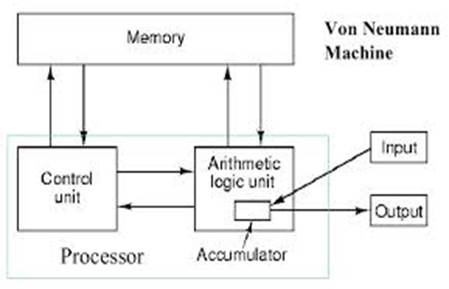
Memory
· 2k x m array of stored bits
· Address -unique (k -bit) identifier of location
· Contents- m-bit value stored in location
Basic Operations:
· LOAD
read a value from a memory location
· STORE
write a value to a memory location
Processing Unit
Functional Units
· ALU = Arithmetic and Logic Unit
· Could have many functional units. some of them special-purpose
(multiply, square root, ... )
· LC-3 performs ADD, AND, NOT
Registers
· Small, temporary storage
· Operands and results of functional units
· LC-3 has eight registers (R0, .., R7), each 16 bits wide
Input and Output
· Devices for getting data into and out of computer memory
· Each device has its own interface, usually a set of registers like the memory’s MAR and MDR
· LC-3 supports keyboard (input) and monitor (output)
keyboard: data register (KBDR) and status register (KBSR)
monitor: data register (DDR) and status register (DSR)
Control Unit
· Orchestrates execution of the program
· Instruction Register (IR) contains the current instruction
· Program Counter (PC) contains the address of the next instruction to be executed.
· Control unit
ü reads an instruction from memory
ü the instruction’s address is in the PC
ü interprets the instruction, generating signals that tell the other components what to do
The Evolution of Computer Programming
The computers can be classified into three categories on the basis of brand.
They are:
a) IBM
1. The computers developed by International Business Machine (IBM) Company are called IBM PCs.
2. IBM is an American multinational information technology company headquartered in Armonk, New York, with operations in over 170 countries. The company began in 1911 as the Computing-Tabulating-Recording Company (CTR) and was renamed "International Business Machines" in 1924.
b) IBM Compatible
3. The computers that have some functional characteristics and principle of IBM computers are called IBM compatible.
c) Apple/Macintosh
4.
All
the computer manufactured by apple cooperation are known as apple/Macintosh
computers, established in late 1970s in the USA.


VIRTUAL COMPUTERS
· A virtual machine (VM) is an operating system (OS) or application environment that is installed on emulated hardware instead of being physically installed on dedicated hardware.
· The end user has the same experience on a virtual machine as they would have on dedicated hardware.
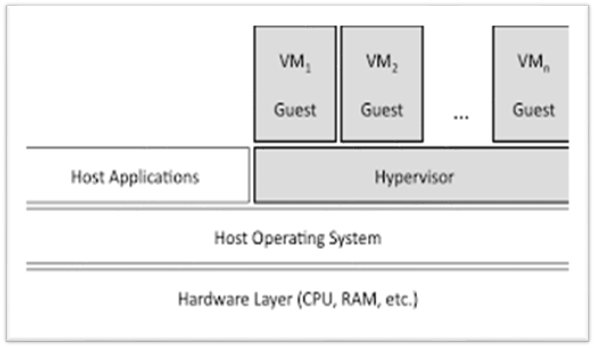
· Specialized software called a hypervisor emulates the PC client or server's CPU, memory, hard disk, network and other hardware resources completely, enabling virtual machines to share the resources.
· The hypervisor can emulate multiple virtual hardware platforms that are isolated from each other.
· Virtual machines that run, for example, Linux and Windows server operating systems, may share the same underlying physical host.
· We can have several virtual machines installed on our system; we’re only limited by the amount of storage we have available for them.
· Once we’ve installed several operating systems, we can open our virtual machine program and choose which virtual machine we want to boot – the guest operating system starts up and runs in a window on our host operating system, although we can also run it in full-screen mode.
· Virtual machines (VMs) are also widely used to run multiple instances of the same operating system, each running the same set or a different set of applications.
· The separate VM instances prevent applications from interfering with each other.
· If one app crashes, it does not affect the programs in the other VMs. This approach differs from a dual-boot or multiboot environment, in which the user has to choose only one OS at startup.
· All virtual machines in the same computer run simultaneously.
Programming Domains
· Scientific Applications:
o Using The Computer As A Large Calculator
o FORTRAN
o Mathematica
· Business Applications:
o Data Processing And Business Procedures
o COBOL,
o Some PL/I
o Spreadsheets
· Systems Programming:
o Building Operating Systems And Utilities
o C, C++
· Parallel Programming:
o Parallel And Distributed Systems
o Ada, CSP, Modula
· Artificial Intelligence:
o uses symbolic rather than numeric computations
o lists as main data structure, flexibility (code = data)
o Lisp, Prolog
· Scripting Languages:
o A list of commands to be executed
UNIX shell programming, awk, tcl, perl
HISTORY OF PROGRAMMING LANGUAGES
First Age of programming languages

Second Age of programming languages

Third Age of programming languages

Fourth Age of programming languages (Internet Age)
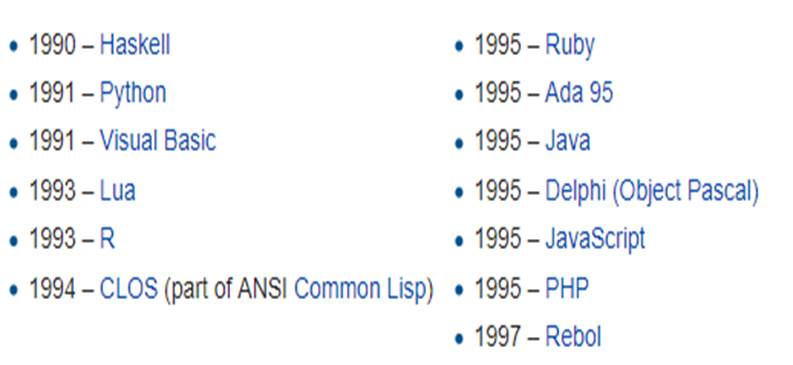
Fifth Age of programming languages (Current Age)
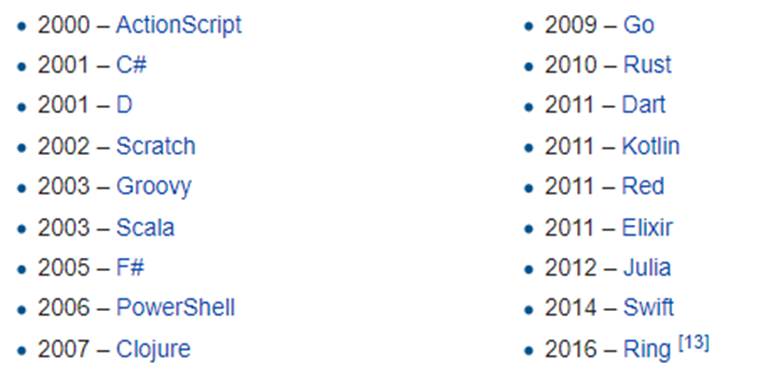
Evolution of Programming Languages
In 1957, the first of the major languages appeared in the form of FORTRAN.
· Its name stands for FORmula Translating system. The language was designed at IBM for scientific computing.
· The components were very simple, Today, this language would be considered restrictive as it only included IF, DO, and GOTO statements, but at the time, these commands were a big step forward.
· The basic types of data in use today got their start in FORTRAN, these included logical variables (TRUE or FALSE), and integer, real, and double-precision numbers.
· Though FORTAN was good at handling numbers, it was not so good at handling input and output, which mattered most to business computing.
Business computing started in 1959, and because of this, COBOL was developed. It was designed as the language for businessmen.
· Its only data types were numbers and strings of text.
· It also allowed for these to be grouped into arrays and records, so that data could be tracked and organized better.
· COBOL statements also have a very English-like grammar, making it quite easy to learn
The Algol language was created by a committee for scientific use in 1958.
· Its major contribution is being the root of the tree that has led to such languages as Pascal, C, C++, and Java.
· It was also the first language with a formal grammar, known as Backus-Naur Form or BNF.
· Though Algol implemented some novel concepts, such as recursive calling of functions his lead to the adoption of smaller and more compact languages, such as Pascal.
Pascal was designed in a very orderly approach (1970);
· it combined many of the best features of the languages in use at the time, COBOL, FORTRAN, and ALGOL.
· The combination of features, input/output and solid mathematical features, made it a highly successful language.
· Pascal also improved the "pointer" data type, a very powerful feature of any language that implements it.
· It also added a CASE statement that allowed instructions to branch like a tree. Pascal also helped the development of dynamic variables, which could be created while a program was being run, through the NEW and DISPOSE commands.
· However, Pascal did not implement dynamic arrays, or groups of variables, which proved to be needed and led to its downfall.
In 1958, LISt Processing (or LISP) language was developed for Artificial Intelligence (AI) research.
· Because it was designed for such a highly specialized field, its syntax has rarely been seen before or since.
· The most obvious difference between this language and other languages is that the basic and only type of data is the list, denoted by a sequence of items enclosed by parentheses.
· LISP programs themselves are written as a set of lists, so that LISP has the unique ability to modify itself, and hence grow on its own.
C was developed in 1972 by Dennis Ritchie.
· All of the features of Pascal, including the new ones such as the CASE statement are available in C.
· C uses pointers extensively and was built to be fast and powerful at the expense of being hard to read. But because it fixed most of the mistakes Pascal had, it won over former-Pascal users quite rapidly.
· C is very commonly used to program operating systems such as UNIX, Windows, the MacOS, and Linux.
In the late 1970's and early 1980's, a new programming method was being developed.
· It was known as Object Oriented Programming, or OOP. Objects are pieces of data that can be packaged and manipulated by the programmer.
· Bjarne Stroustroup liked this method and developed extensions to C known as "C with Classes."
In early 1990s Sun Microsystems developed a new object oriented language called Java was introduced.
· Java is first Programming language which is not attached with any particular hardware or operating system.
· Program developed in java can be executed anywhere and on any system.
A high-level programming language that is interpreted by another program at runtime rather than compiled by the computer's processor as other programming languages (such as C and C++) is Scripting languages,
· it can be embedded within HTML, commonly are used to add functionality to a Web page, such as different menu styles or graphic displays or to serve dynamic advertisements.
· These types of languages are client-side scripting languages, affecting the data that the end user sees in a browser window.
· Other scripting languages are server-side scripting languages that manipulate the data, usually in a database, on the server.
· JavaScript, ASP, JSP, PHP, Perl, and Python are examples of scripting languages.
Computer Programming Paradigms
· Programming languages may enforce a certain programming style is called as programming paradigms and classified in four categories:
o Imperative Programming,
o Object-Oriented Programming,
o Functional Programming and
o Logic Programming.
· Imperative Programming
o Introduction:
ü The imperative programming paradigm assumes that the computer can maintain through environments of variables any changes in a computation process.
ü Computations are performed through a guided sequence of steps, in which these variables are referred to or changed.
ü The order of the steps is crucial, because a given step will have different consequences depending on the current values of variables when the step is executed.
· Advantages
ü It is efficient;
ü It is close to the machine;
ü It is popular;
ü It is easy to familiar
· Disadvantages
ü Its semantics of a program is complex to understand or prove, because of referential transparency does not hold (due to side effects)
ü Its programming debugging is harder;
ü Its abstraction/Notion/Thoughts/Construction is more limited;
ü Order of steps is crucial, which doesn't always suit itself to problems.
ü
· Logical Programming
Introduction:
o The Logical Programming Paradigm takes a declarative approach to problem-solving.
o Various logical assertions about a situation are made, establishing all known facts. Then queries are made.
o The role of the computer becomes maintaining data and logical deduction.
o A logical program is divided into three sections:
o a series of definitions/declarations that define the problem domain
o statements of relevant facts
o statement of goals in the form of a query
o Any deducible solution to a query is returned. The definitions and declarations are constructed entirely from relations. i.e. X is a member of Y or X is in the internal between a and b etc.
Advantages:
ü It can be used to express knowledge in a way that does not depend on the implementation, making programs more flexible, compressed and understandable.
ü It enables knowledge to be separated from use, ie the machine architecture can be changed
ü without changing programs or their underlying code.
ü It can be altered and extended in natural ways to support special forms of knowledge, such
ü as meta-level or higher-order knowledge.
ü It can be used in non-computational disciplines relying on reasoning and precise means of expression.
Disadvantages:
ü Poor facilities for supporting arithmetic, types, etc. had a discouraging effect on the programming community.
ü There is no adequate way of representing computational concepts found in built-in mechanisms of state variables (as is usually found in conventional languages).
· Functional Programming
Introduction
o The Functional Programming paradigm views all subprograms as functions, they take in arguments and return a single solution.
o The solution returned is based entirely on the input, and the time at which a function is called has no relevance. The computational model is therefore one of function application and reduction.
Advantages
ü It allows programmer to write more compressed and predictable code.
ü it’s easier to test.
Disadvantages
ü Deterministic functions without side-effects, means that it returns the same result for the same set of input values.
ü Avoiding shared state, mutable data
· Object-Oriented Programming
· Introduction
o Object Oriented Programming (OOP) is a paradigm in which real-world objects are each viewed as separate entities having their own state which is modified only by built in procedures, called methods.
o Because objects operate independently, they are encapsulated into modules which contain both local environments and methods. Communication with an object is done by message passing.
o Objects are organized into classes, from which they inherit methods and equivalent variables. The object-oriented paradigm provides key benefits of reusable code and code extensibility.
Advantages
ü The programmes written with OOP are really easy to understand.
ü Since everything is treated as objects, so we can model a real-world concept using OOP.
ü OOP approach offers the reusability of classes. We can reuse the classes that are already created without writing them again and again.
ü Since the parallel development of classes is possible in OOP concept, It results in the quick development of the complete programmes.
ü Programmes written in OOP technique are marginally easier to test, manage as well as maintain.
ü It is a secured development technique since data is hidden and can’t be accessed by external functions.
Disadvantages
ü Sometimes, the relation among the classes become artificial in nature.
ü Designing a program in OOP concept is a little bit tricky.
ü The programmer should have a proper planning before designing a program using OOP approach.
ü Since everything is treated as objects in OOP, the programmers need proper skill such as design skills, programming skills, thinking in terms of objects etc.
ü The size of programmes developed with OOP is larger than the procedural approach.
ü Since larger in size, that means more instruction to be executed, which results in the slower execution of programmes.
Programming Language Implementation
Programming source code has various structures and commands, but computer processor understand machine code.
Computer Language Translator converts source code written in HLL or Assembly Language into language i.e. machine code that the computer processor understands.
It can be classified into three categories: 1. Assembler, 2. Interpreter and 3. Complier
Assembler
An assembler translates assembly language into machine code. Assembly language consists of mnemonics for machine opcodes so assemblers perform a 1:1 translation from mnemonics to a direct instruction.
For example:
LDA #4 converts to 0001001000100100
Conversely, one instruction in a assembly language will translate to one or more instructions at machine level.

 Role of Assembler
Source Code-> -> Object Code -> Executable Code
|

 <-
<-
Linker - joins object files into one executable
Loader – brings executable into memory
Runner – starts execution
Advantages of using an Assembler:
1. Very fast in translating assembly language to machine code as 1 to 1 relationship
2. Assembly code is often very efficient (and therefore fast) because it is a low level language
3. Assembly code is fairly easy to understand due to the use of English-like mnemonics
Disadvantages of using Assembler:
1. Assembly language is written for a certain instruction set and/or processor
2. Assembly tends to be optimised for the hardware it's designed for, meaning it is often incompatible with different hardware
3. Lots of assembly code is needed to do relatively simple tasks, and complex programs require lots of programming time
Interpreter
An interpreter program executes other programs directly, running through program code and executing it line-by-line.
As it analyses every line, an interpreter is slower than running compiled code but it can take less time to interpret program code than to compile and then run it — this is very useful when prototyping and testing code.
Interpreters are written for multiple platforms, this means code written once can be run immediately on different systems without having to recompile for each.
Examples of this include flash based web programs that will run on your PC, MAC, games console and Mobile phone.
Advantages of using an Interpreter
Easier to debug(check errors) than a compiler
Easier to create multi-platform code, as each different platform would have an interpreter to run the same code
Useful for prototyping software and testing basic program logic
Disadvantages of using an Interpreter
Source code is required for the program to be executed, and this source code can be read making it insecure
Interpreters are generally slower than compiled programs due to the per-line translation method
Compiler
A Compiler is a computer program that translates code written in a high-level language to a low-level language, object/machine code. The most common reason for translating source code is to create an executable program (converting from a high-level language into machine language).


Advantages of using a compiler
1. Source code is not included, therefore compiled code is more secure than interpreted code
2. Tends to produce faster code than interpreting source code
3. Produces an executable file, and therefore the program can be run without need of the source code
Disadvantages of using a compiler
1. Object code needs to be produced before a final executable file, this can be a slow process
2. The source code must be 100% correct for the executable file to be produced
Stages of

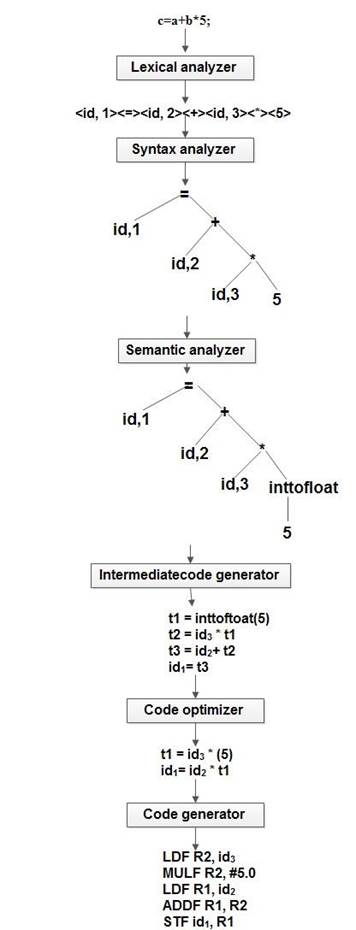
Lexical Analysis
1.It is the first phase of the compiler. It gets input from the source program and produces tokens as output.
2.It reads the characters one by one, starting from left to right and forms the meaningful lexemes, called tokens.
3.Token : It represents a logically cohesive sequence of characters such as keywords, operators, identifiers, special symbols etc.
Syntax Analysis
1.The next phase is called the syntax analysis or parsing.
2.It takes the token produced by lexical analysis as input and generates a parse tree (or syntax tree).
3.In this phase, token arrangements are checked against the source code grammar, i.e. the parser checks if the expression made by the tokens is syntactically correct.
Semantic Analysis
1.Semantic analysis checks whether the parse tree constructed follows the rules of language. For example, assignment of values is between compatible data types, and adding string to an integer.
2.Also, the semantic analyzer keeps track of identifiers, their types and expressions; whether identifiers are declared before use or not etc.
3.The semantic analyzer produces an annotated syntax tree as an output.
Intermediate Code Generation
1.After semantic analysis the compiler generates an intermediate code of the source code for the target machine.
2.It represents a program for some abstract machine.
3.It is in between the high-level language and the machine language.
4.This intermediate code should be generated in such a way that it makes it easier to be translated into the target machine code.
Code Optimization
1.The next phase does code optimization of the intermediate code.
2.Optimization can be assumed as something that removes unnecessary code lines, and arranges the sequence of statements in order to speed up the program execution without wasting resources (CPU, memory).
Code Generation
1.In this phase, the code generator takes the optimized representation of the intermediate code and maps it to the target machine language.
2.The code generator translates the intermediate code into a sequence of (generally) re-locatable machine code.
3.Sequence of instructions of machine code performs the task as the intermediate code would do.
Symbol Table
1.It is a data-structure maintained throughout all the phases of a compiler.
2.All the identifier's names along with their types are stored here.
3.The symbol table makes it easier for the compiler to quickly search the identifier record and retrieve it.
4.The symbol table is also used for scope management.
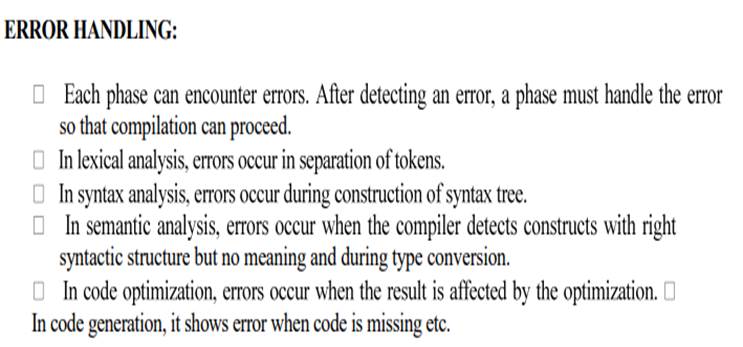


Issues in Language Translation
Context-Free Grammar
1. According to Noam Chomosky, there are four types of grammars − Type 0, Type 1, Type 2, and Type 3.
|
Grammar Type |
Grammar Accepted |
Language Accepted |
Automaton |
|
Type 0 |
Unrestricted grammar |
Recursively enumerable language |
Turing Machine |
|
Type 1 |
Context-sensitive grammar |
Context-sensitive language |
Linear-bounded automaton |
|
Type 2 |
Context-free grammar |
Context-free language |
Pushdown automaton |
|
Type 3 |
Regular grammar |
Regular language |
Finite state automaton |
2. Two of these grammar classes, Context free Grammar and regular Grammar, are fruitful for describing the syntax of programming language.
3. Regular Grammar are used to describe tokens of Programming Language and CFG are used to describe syntax of programming language. Regular expressions are not powerful enough to define many aspects of a programming language's syntax.
a. A regular expression cannot be used to specify that the parentheses in an expression must be balanced, or that every ``else'' statement has a corresponding ``if''.
b. the following regular expression defines integer arithmetic involving addition, subtraction, multiplication, and division:
digit+ (("+" | "-" | "*" | "/") digit+)*
but provides no information about the precedence and associativity of the operators.
4. A context-free grammar (CFG) is a certain type of formal grammar: a set of production rules that describe all possible strings in a given formal language.
5. Production rules are simple replacements. For example, the rule
A -> α
6. There can be multiple replacement rules for any given value. For example,
A -> β
7. means that A can be replaced with either α or .β
8. If we start with the nonterminal symbol S then we can use the rule S -> A A to turn S into AA.
9. We can then apply one of the two later rules., For example, if we apply A -> β
S -> βA
If we then apply, A -> α to the second A,
Then result will be β α
10. Since both α and β, are terminal symbols, and in context-free grammars terminal symbols never appear on the left hand side of a production rule, there are no more rules that can be applied.
11. This same process can be used, applying the last two rules in different orders in order to get all possible strings within our simple context-free grammar.
A context-free grammar G is defined by the 4-tuple
A context-free grammar (CFG) consisting of a finite set of grammar rules is a quadruple (N, T, P, S) where
· N is a set of non-terminal symbols.
· T is a set of terminals
· P is a set of rules,
· S is the start symbol.
Example: Simple Arithmetic Expressions
1. A context-free grammar (CFG) for the language of (very simple) arithmetic expressions involving only subtraction and division can be easily thought as:
· An integer is an arithmetic expression.
· If exp1 and exp2 are arithmetic expressions, then so are the following:
· exp1 - exp2
· exp1 / exp2
· ( exp1 )
· exp --> INTLITERAL
· exp --> exp MINUS exp
· exp --> exp DIVIDE exp
· exp --> LPAREN exp RPAREN
2. The grammar has five terminal symbols: INTLITERAL MINUS DIVIDE LPAREN RPAREN.
3. The grammar has one nonterminal: exp (note that a single name, exp, is used instead of exp1 and exp2 as in the English definition above).
4. The grammar has four productions or rules, each of the form: exp --> ...
5. A more compact way to write this grammar is:
exp --> INTLITERAL | exp MINUS exp | exp DIVIDE exp | LPAREN exp RPAREN
Backus-Naur form:
1. In 1960 John Bakus and Peter Naur introduced formal method For describing Syntax of programming language which is known as Backus Naur form or simply BNF.
2. BNF defines the syntax of a high level language using these symbols -
|
::= |
'is defined by' |
|
| |
'OR' |
|
< > |
define a meta variable |
Example definition:
|
<hexdigit> |
::= |
0|1|2|3|4|5|6|7|8|9|A|B|C|D|E|F |
3.One definition can then be used as part of another...
|
<hexnumber> |
::= |
<hexdigit> | <hexdigit> <hexnumber> |
4.example of a recursive definition - one where the definition uses the thing being defined (!)
Example
|
1 |
<digit> |
::= |
0|1|2|3|4|5|6|7|8|9 |
|
2 |
<letter> |
::= |
A|B|C|D|E|......|X|Y|Z |
|
3 |
<integer> |
::= |
<digit> | <digit> <integer> |
|
4 |
<word> |
::= |
<letter> | <letter> <word> |
|
5 |
<variable> |
::= |
<letter> | <letter> <integer> |
|
6 |
<relation> |
::= |
< | > | = |
|
7 |
<condition> |
::= |
<variable> <relation> <integer> |
1. Another way to derive things using a context-free grammar is to construct a parse tree (also called a derivation tree)
3.Parsing is testing whether the rules of syntax have been obeyed.
Example of parsing (using the above definitions)
Test if 'B8>145' is a valid 'condition'.
|
Rules used: |
Condition |
|||||
|
7 |
variable |
relation |
integer |
|||
|
5,3 |
letter |
integer |
|
digit |
integer |
|
|
3 |
|
|
|
|
digit |
integer |
|
3 |
|
|
|
|
|
digit |
|
2,1,6 |
B |
8 |
> |
1 |
4 |
5 |
This parse tree shows that 'B8>145' is a valid 'condition'.
4. Example expression grammar, here's a parse tree that derives 1 - 4 / 2:

If for grammar G and string S there is:
· more than one leftmost derivation of S or,
· more than one rightmost derivation of S, or
· more than one parse tree for S
then G is called an ambiguous grammar.
The string 1 - 4 / 2 has two parse trees using the example expression grammar.
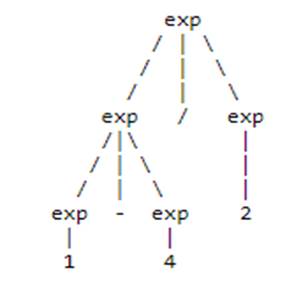
In general, ambiguous grammars cause problems:
· Ambiguity can make parsing difficult.
· The underlying structure of the language defined by an ambiguous grammar is ill-defined
Since every programming language includes expressions, it is useful to know how to write a grammar for an expression language so that the grammar correctly reflects the precedences and associativities of the operators.
exp --> exp MINUS exp | termterm --> term DIVIDE term | factorfactor --> INTLITERAL | LPAREN exp RPAREN
Now let's try using these new rules to build parse trees for 1 - 4 / 2. First, a parse tree that correctly reflects that fact that division has higher precedence than subtraction:

Now we'll try to construct a parse tree that shows the wrong precedence:

Associativity
This grammar captures operator precedence, but it is still ambiguous! Parse trees using this grammar may not correctly express the fact that both subtraction and division are left associative;
e.g., the expression: 5-3-2 is equivalent to: ((5-3)-2) and not to: (5-(3-2)).
To write a grammar that correctly expresses operator associativity:
· For left associativity, use left recursion.
· For right associativity, use right recursion.
Here's the correct grammar:
· exp --> exp MINUS term | term
· term --> term DIVIDE factor | factor
· factor --> INTLITERAL | LPAREN exp RPAREN
And here's the (one and only) parse tree that can be built for 5 - 3 - 2 using this grammar:
